If you’re not organizing the fundraiser on your own, you can easily add a co-organizer or manager to help you run your Fun Run.
To add a co-organizer or another manager:
Ask your co-organizer to create an account at https://myfunrun.com/.
Once their account is active, you can either:
-
Invite them as a Manager directly through your MyFunRun dashboard, or
-
Send their email address to our team, and we will assign them as a Manager for your school.
Why add a co-organizer or manager?
-
Both organizers can submit requests, review reports, and make updates
-
Communication stays clear and consistent
-
Access is restricted to authorized users only
Requests from individuals who are not listed as organizers or managers cannot be processed for privacy and security reasons.
Important Security Note
To protect your school and your fundraisers’ information, any requests coming from users who are not recognized as managers or organizers may be flagged as spam by the system.
Once the user has created an account, head to Administration → Managers.
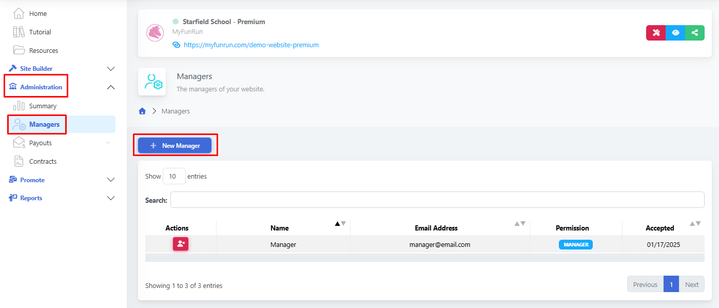
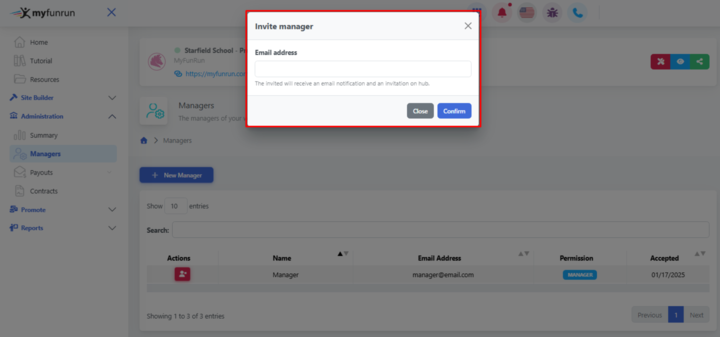
Add the e-mail of the designated person to be set as a manager to complete the process.
Feel free to contact the Support or your Program Manager assigned to your Fun Run to help you if necessary.
Etiquetas:
¿Fue útil este artículo?
Pruébalo gratis durante 7 días
No se necesita tarjeta de crédito.
¿Necesitar ayuda?
Comuníquese con nuestro equipo de soporte al número gratuito 1.877.769.3836.