The Classmates feature allows you to collect and display a wide variety of information, and it’s fully customizable to fit your needs.
When someone registers, you can ask them to provide specific details using custom questions. These can include things like the number of children, current work, whether they have a favorite teacher, and much more.
This helps you build richer classmate profiles that go beyond just a name.
If you have an open registration, they will be free to add information accordingly.
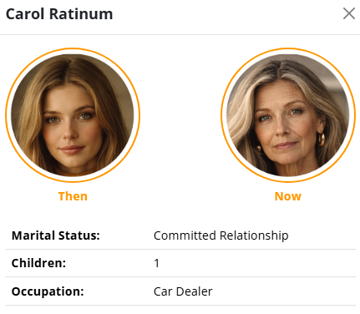
Once participants are registered, it is possible to add a photo and additional information to each classmate's profile.
By doing this, each classmate will have a more complete and visually clear display, making them easier to recognize and manage. The result will look similar to the example shown below.
Inside your Participants section, you’ll find a search option that allows you to quickly look up classmates.
Simply start typing a name, and the system will filter the list so you can easily locate and access the classmate you’re looking for.

At any time, you can return to a classmate’s profile to update their picture or edit their information. This ensures your classmate list stays organized, accurate, and useful throughout your event.
Was this article helpful?
Try it free for 7 days
No credit card needed.
Need Help?
Please contact our support team toll free at 1.877.769.3836.