

Give your team the right access to help manage your website
Roles & Permissions lets you control what each team member can see and do on your site. Choose from ready-made roles or create your own custom roles with exactly the permissions you want.
How Roles & Permissions works
Each manager is assigned a role. The role determines which areas of the dashboard they can access and which actions they can perform.
You can choose from ready-made roles or create a custom role based on your team's needs.
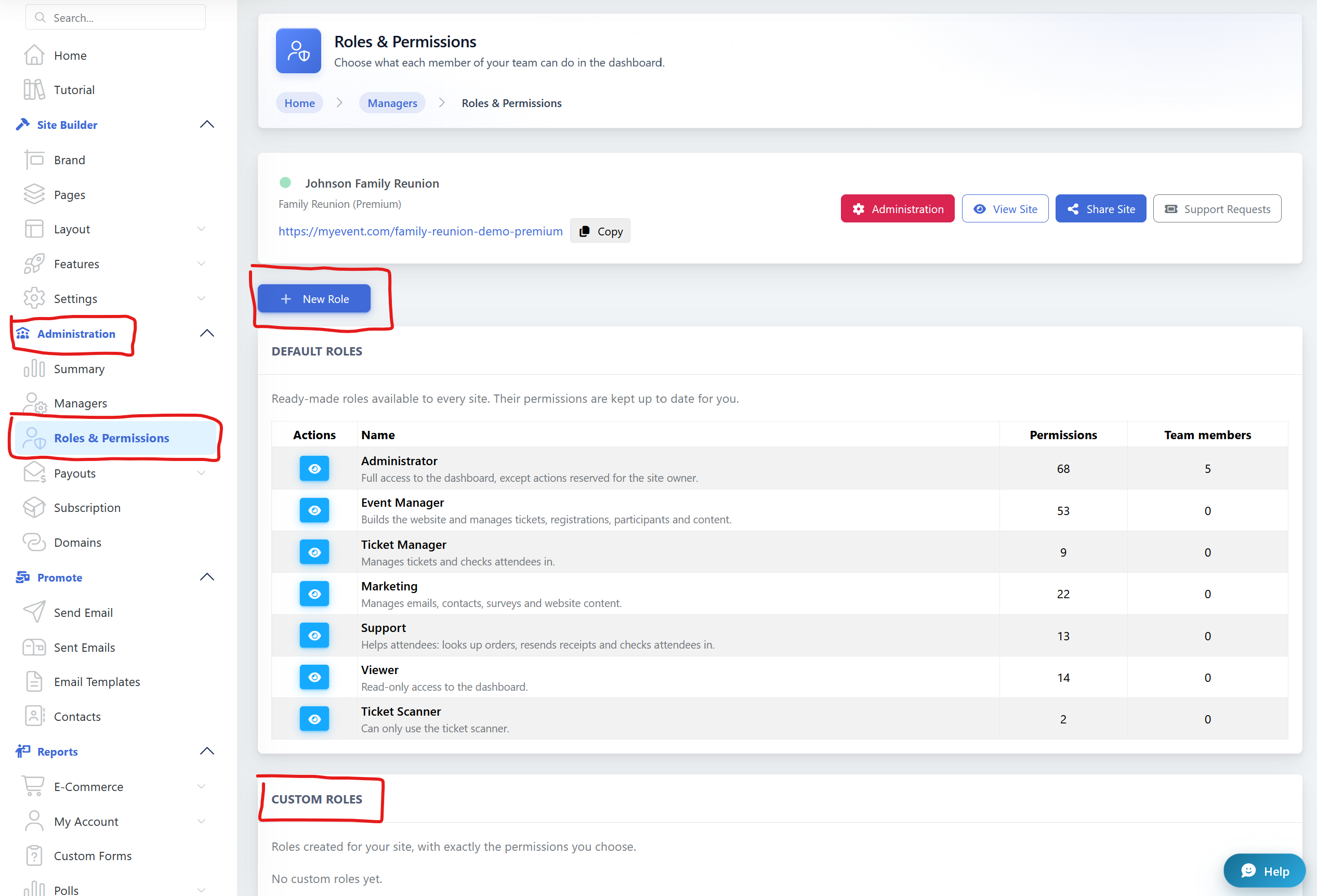
Available roles include:
- Administrator - Has extensive access to the dashboard and site management tools, except for actions reserved for the site owner.
- Event Manager - Can build the website and manage tickets, registrations, participants, and content.
- Ticket Manager - Can manage tickets and check attendees in.
- Marketing - Can manage emails, contacts, surveys, and website content.
- Support - Can help attendees, look up orders, resend receipts, and check attendees in.
- Viewer - Has read-only access to the dashboard and cannot make changes.
- Ticket Scanner - Can only access the ticket scanning tools to check attendees in.
Create your own custom roles
You can also create a custom role when the ready-made roles don't fit your team's needs.
Go to: Administration → Roles & Permissions → New Role
You can choose exactly which permissions the role should have. This allows you to create a role tailored to a specific responsibility.
For example, you could create a role for someone who should be able to manage website content and emails, but shouldn't have access to tickets or other areas of the site.
What can each role access?
Each role has its own set of permissions. A team member will only see and be able to use the areas and actions included in their assigned role.
You can review the permissions for each ready-made role under Administration → Roles & Permissions.
This makes it easier to divide responsibilities among your team while keeping control over more sensitive areas of your site.
Some actions are reserved for the site owner
For security reasons, certain sensitive actions can only be performed by the site owner. These permissions cannot be assigned to another role.
This includes:
- Manage payout methods — Add or change the bank account, cheque, or wire transfer information used for payouts.
- Payout security — Set or manage the payout password and PIN.
- Payout tax form — Submit the tax information associated with payouts.
- Stripe account — Manage the Stripe account, onboarding, and identity verification.
Even if someone has an Administrator role, these actions remain owner-only.
Change or remove access anytime
Team responsibilities can change, and you can update access whenever you need to.
From Administration → Managers, the site owner can manage the people who have access to the site and change their assigned role or remove their access.
Role and permission changes take effect immediately.
Need to invite someone to help manage your site?
See How to invite someone to be a manager of my site? for step-by-step instructions.